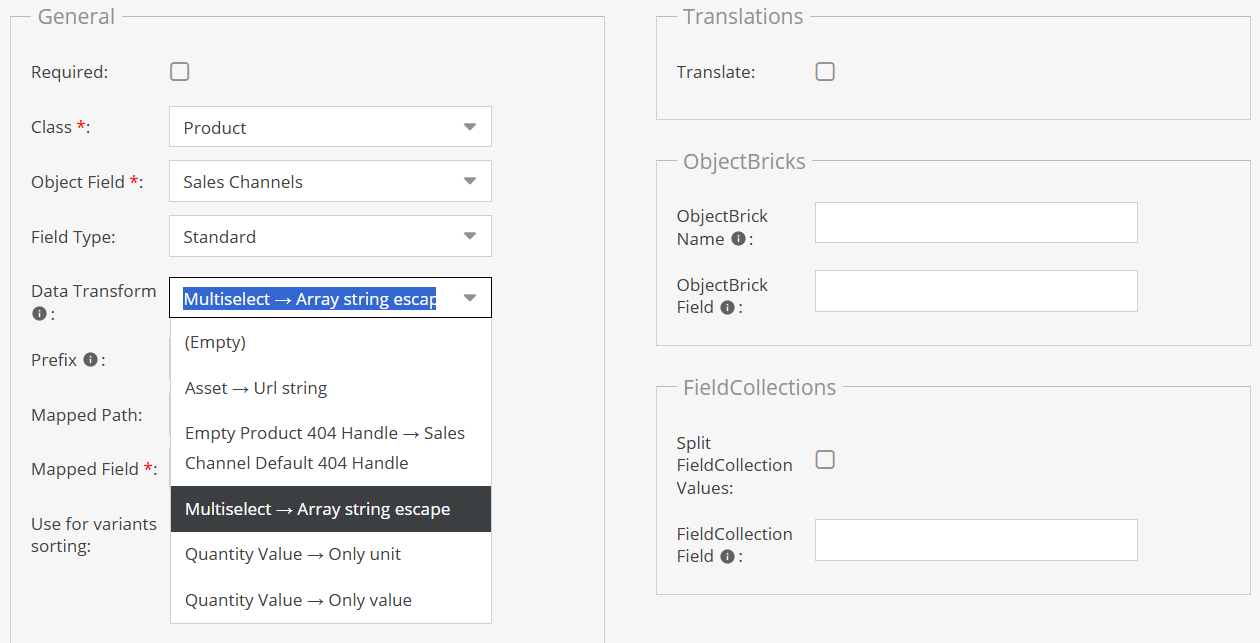
Operatore Mappatura
L'operatore custom può essere utilizzato quando si ha necessità di trasformare un singolo campo, come ad esempio estrarre solo l'unità di misura da un campo quantity value.
Per creare un operatore custom per elaborare il campo da sincronizzare è necessario:
- Estendere la classe astratta
Sintra\SyncBundle\Service\CustomOperatorFieldClassProvider\AbstractCustomOperatorFieldProvider - Registrarla come servizio
Esempio di operatore custom:
<?php

namespace Sintra\SyncBundle\Service\CustomOperatorFieldClassProvider;

use Pimcore\Model\DataObject\Data\QuantityValue;
use Pimcore\Model\DataObject\SalesChannel;
use Pimcore\Model\DataObject\SalesChannelMapping;
use Sintra\SyncBundle\Exception\InvalidCustomOperatorTypeException;
use Symfony\Component\DependencyInjection\Attribute\AutoconfigureTag;

#[AutoconfigureTag(self::CUSTOM_OPERATOR_FIELD_CLASS_KEY)]
class QuantityValueExtractUnit extends AbstractCustomOperatorFieldProvider
{
    public function getPrettyName(): string
    {
        return 'Quantity Value → Only unit';
    }

    public function getCustomOperatorFieldResult(SalesChannel $saleChannel, SalesChannelMapping $channelMapping, mixed $fieldValue): string
    {
        if (empty($fieldValue)) {
            return '';
        }

        if (!$fieldValue instanceof QuantityValue) {
            throw new InvalidCustomOperatorTypeException("Invalid value for custom operator {$this->getPrettyName()},
                the value is not an instance of QuantityValue");
        }

        return $fieldValue->getUnit()->getAbbreviation() ?? '';
    }
}
informazioni
Per mantenere armonia nel front-end è preferibile che getPrettyName() ritorni i valori separati da freccia Quantity Value → Only unit.
Una volta fatto questo sarà disponibile nella select all'interno del SalesChannelMapping.